OpenCard, the loyalty card app for your phone

OpenCard keeps your shop loyalty cards on your phone and your smartwatch, and shows the code to the scanner at the till.
It is free, needs no account and works offline.
 Scan to get the app


Adding a card
Point the camera at the code and the card is in: the scanner works out what kind of code it is. OpenCard draws 18 kinds of code, from the barcodes and QR codes on everyday cards to Aztec, Data Matrix and PDF417. If you already have a photo of the card, or the card came to you as a PDF, the code is read from there. If the code is damaged, or the phone will not take it, you type the number by hand.
At the till
Open the card and the screen goes to full brightness on its own, so the scanner reads it first time. As soon as you leave, the brightness goes back to what it was.
Loyalty cards on your smartwatch
With an Android phone, the cards reach your watch as well. OpenCard runs on smartwatches with Wear OS 3 or later, such as the Samsung Galaxy Watch and the Google Pixel Watch: pick a card on the watch and the code opens full screen at full brightness, ready for the scanner at the till. The phone sends the cards to the watch over Bluetooth, without going through the internet, every time you add or change one, and on the watch too the file with the cards is encrypted.
With an iPhone, the cards reach your Apple Watch, from version 1.0.7. The watch app installs together with the iPhone app and needs watchOS 9 or later: the cards move from the phone to the watch as soon as the iPhone is in reach, and at the till the code opens on your wrist. One tap closes the card.
What it does
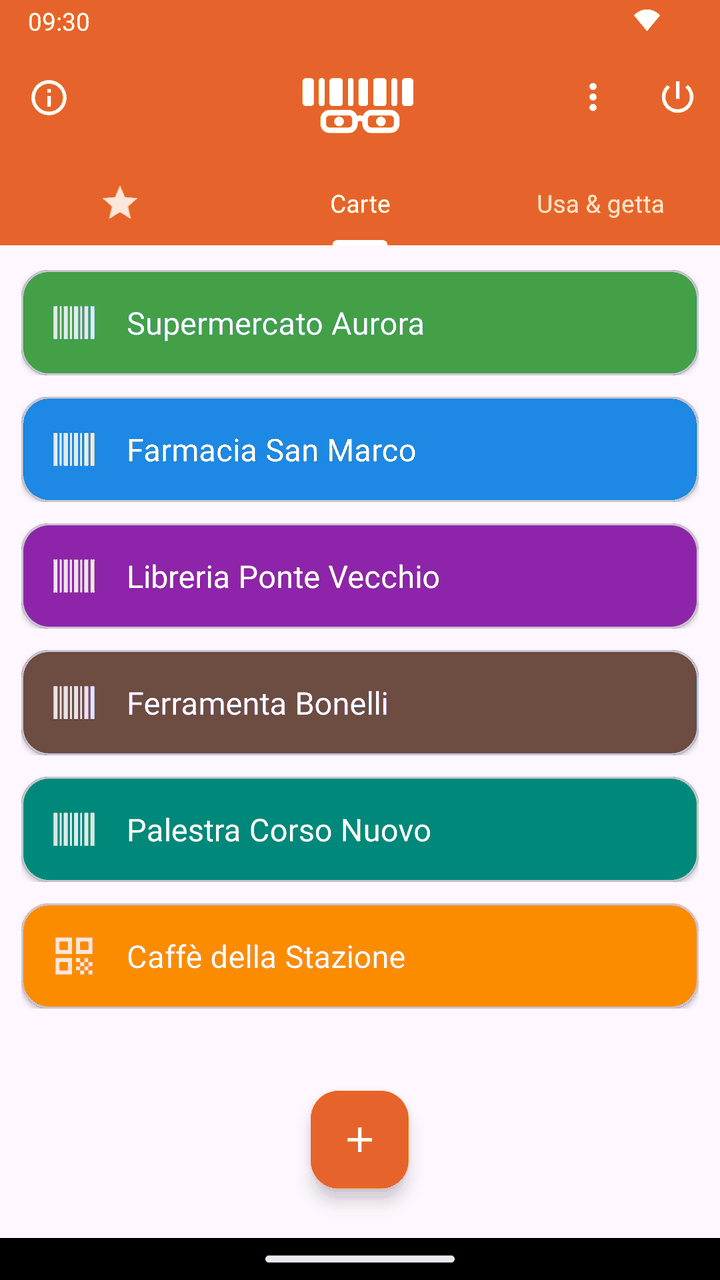
- Loyalty cards and single-use cards, kept apart.
- The cards you use most get a star and sit in the first tab you see when the app opens.
- Free ordering: drag a card wherever you want it.
- With more than five cards in a tab, a search field appears: type part of the name and only the cards that contain it stay on screen.
- A colour for each card, so you recognise it without reading the name.
- A note, the expiry date, the balance and photos of the front and back for every card, for what is printed on the card but not held in the code.
- Backup to a file, which you save where you like and read back when you need it: an archive with the cards and their photos, which you can lock with a password. Cards can also be exported as CSV, and a CSV from Catima can be imported.
- Phone-to-phone copy over a QR code: one shows it, the other scans it, and the cards move across without touching the internet. The codes can also be saved to a PDF, for when the other phone is not there.
- On Android a card can go on the home screen as a widget, and one tap opens it.
- The app speaks English and Italian: it follows the phone’s language, or you pick one in the settings.
What it does not do
No sign-up, no adverts, no usage statistics. OpenCard does not use the network, so it sends nothing to anyone: the cards, their photos and the backups stay on the phone, and the file with the cards is encrypted. Whether the cards go into the phone’s backup is up to you, with a switch in the settings. The camera comes on only when you use it, to read a code or photograph a card.
Exodus Privacy, which checks Android apps for trackers, finds none in the Google Play version, and the app has no network permission. The report is available on the Exodus Privacy website (opens in a new tab).
What the app stores, what the camera is for and what happens to the backups is written in the OpenCard privacy policy, which is in Italian.
For iPhone
Since 31 August 2026 OpenCard is on the App Store as well, free and with the same features as the Android version, apart from the home-screen widget. Since version 1.0.7 there is an Apple Watch app as well. It needs iOS 15 or later, so an iPhone 6s or newer.
The source is open
OpenCard is free software under the AGPL v3 licence. The code is available at github.com/denovo-it/opencard (opens in a new tab): anyone who wants to check what the app does can read it, and anyone who wants to change it can do so under the terms of the licence.
Personal use is free. For commercial use, write to info@denovo.srl.
Who makes it
OpenCard is a gift from Denovo srl, based in Terni, Italy. Denovo is an innovative startup and benefit corporation working across four fields, artificial intelligence, mechatronics, blockchain and cybersecurity, and alongside them it publishes its own Android and iPhone apps.
Problems and requests
To report a fault or ask for a feature, write to info@denovo.srl. Anyone with a GitHub account can open an issue in the repository.
Frequently asked questions
Does OpenCard work on a smartwatch?
Yes, since version 1.0.4, on smartwatches with Wear OS 3 or later, such as the Samsung Galaxy Watch and the Google Pixel Watch, paired with an Android phone running OpenCard. The phone sends the cards to the watch over Bluetooth, without going through the internet, and at the till the code opens full screen on the watch.
Can I put loyalty cards on an Apple Watch?
Yes, from OpenCard version 1.0.7. The Apple Watch app installs together with the iPhone app and needs watchOS 9 or later: the cards move from the iPhone to the watch as soon as the phone is in reach. On iPhone it needs iOS 15 or later.
Does OpenCard need an internet connection or an account?
No. It asks for no sign-up, has no adverts and no usage statistics, and works offline: on Android it does not even have the network permission. The cards stay on the phone in an encrypted file, and the app is free.
How do I move my loyalty cards to a new phone?
With a QR code: the old phone shows it, the new one scans it, and the cards move across without the internet, from Android to iPhone and back as well. You can also use a file backup locked with a password, and OpenCard imports the CSV exported by Catima.